Hey folks,
If you ever find yourself desperately debugging an ApplicationStop failure in your AWS CodeDeploy deployment, you have to watch out for one little gotcha: the agent is running the old revision’s Stop script, not your latest change.
If that doesn’t feel intuitive right away, it helps to think in how CodeDeploy’s hooks and events and ordered. For example:
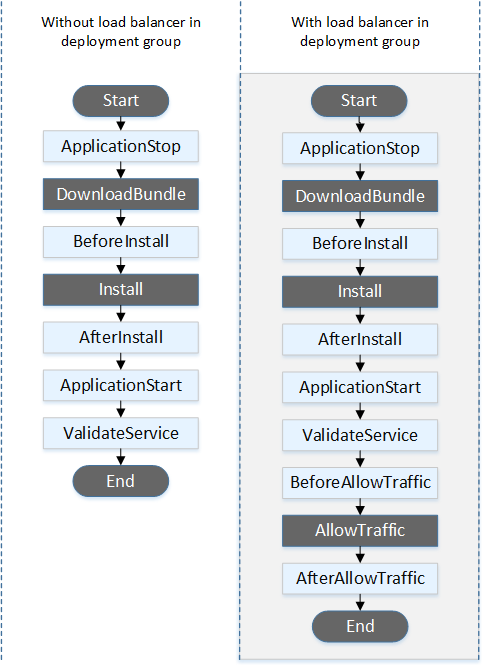
As you can see, ApplicationStop, along with BeforeBlockTraffic and AfterBlockTraffic, occur before your latest revision is downloaded. That means CodeDeploy will read these hooks from the last successfully deployed revision. The agent finds it by reading a pointer file on the instance:
$ cat /opt/codedeploy-agent/deployment-root/deployment-instructions/<dg-id>_last_successful_install
/opt/codedeploy-agent/deployment-root/<dg-id>/d-GTJ6QQ2EL
Whatever appspec.yml puts at that path is what runs. It’s actually intuitive, once you think about the model, as ApplicationStop runs before DownloadBundle, so at that moment your new revision doesn’t exist on the host yet. The only AppSpec available is the previous one.
This makes changes to a ApplicationStop script a bit of dangerous operation. It’ll ship without problem through your whole pipeline and detonate much later. The revision containing a bad Stop script will deploy successfully, because the previous revision’s healthy script is what ran. The damage lands on the next deployment—and every one after it—with every downstream event marked as Skipped.
The deployment-level error is just HEALTH_CONSTRAINTS, which tells you little. The useful message to watch out for, in the agent log, will be something like: Script at specified location: scripts/application_stop.sh failed with exit code 1.
How Do You Fix It?
Redeploying/Restarting the group isn’t the fix. You’ll have to force it through by using the ignore-application-stop-failures flag. Example:
aws deploy create-deployment \
--application-name MyApp \
--deployment-group-name Prod \
--s3-location bucket=my-bucket,key=good-revision.zip,bundleType=zip \
--ignore-application-stop-failures
ApplicationStop will still report as Failed, but the deployment will succeed. This is the quickest one-time fix, as once a healthy revision is the last successful one, ordinary deployments work again.
Bonus Points: What Happens the First Time?
On a first-ever deployment there is no pointer file, so nothing runs. The agent logs Lifecycle event ApplicationStop is a noop and the CodeDeploy Console reports it as ApplicationStop: Succeeded. Don’t use this first-time message as proof that your Stop script works—you’ll find that out on your next deployment!
Hopefully, your coding agent will soon have this tip in its training data. I know a human is only reading this because they found no other solution!
Anyway, good luck with your deployments!
–Filip